SAP News
SAP S/4HANA Cloud 2608: Key Sales Updates for Learners

On September 21, 2026, SAP released a blog detailing the latest enhancements in Sales in SAP S/4HANA Cloud Public Edition 2608. These updates bring significant improvements to user experience and process control, particularly within the Fiori applications. For anyone working with or learning SAP's sales and distribution functionalities, understanding these changes is crucial for staying current with the platform's evolution.
What's New in Sales in SAP S/4HANA Cloud Public Edition 2608?
The latest release of SAP S/4HANA Cloud Public Edition 2608 brings key updates that streamline sales processes. These enhancements primarily focus on the Manage Sales Orders – Version 2 Fiori app and introduce a new automated supply block functionality. Users will experience improved address management and greater control over order fulfillment.
How Has Address Management Improved in Fiori?
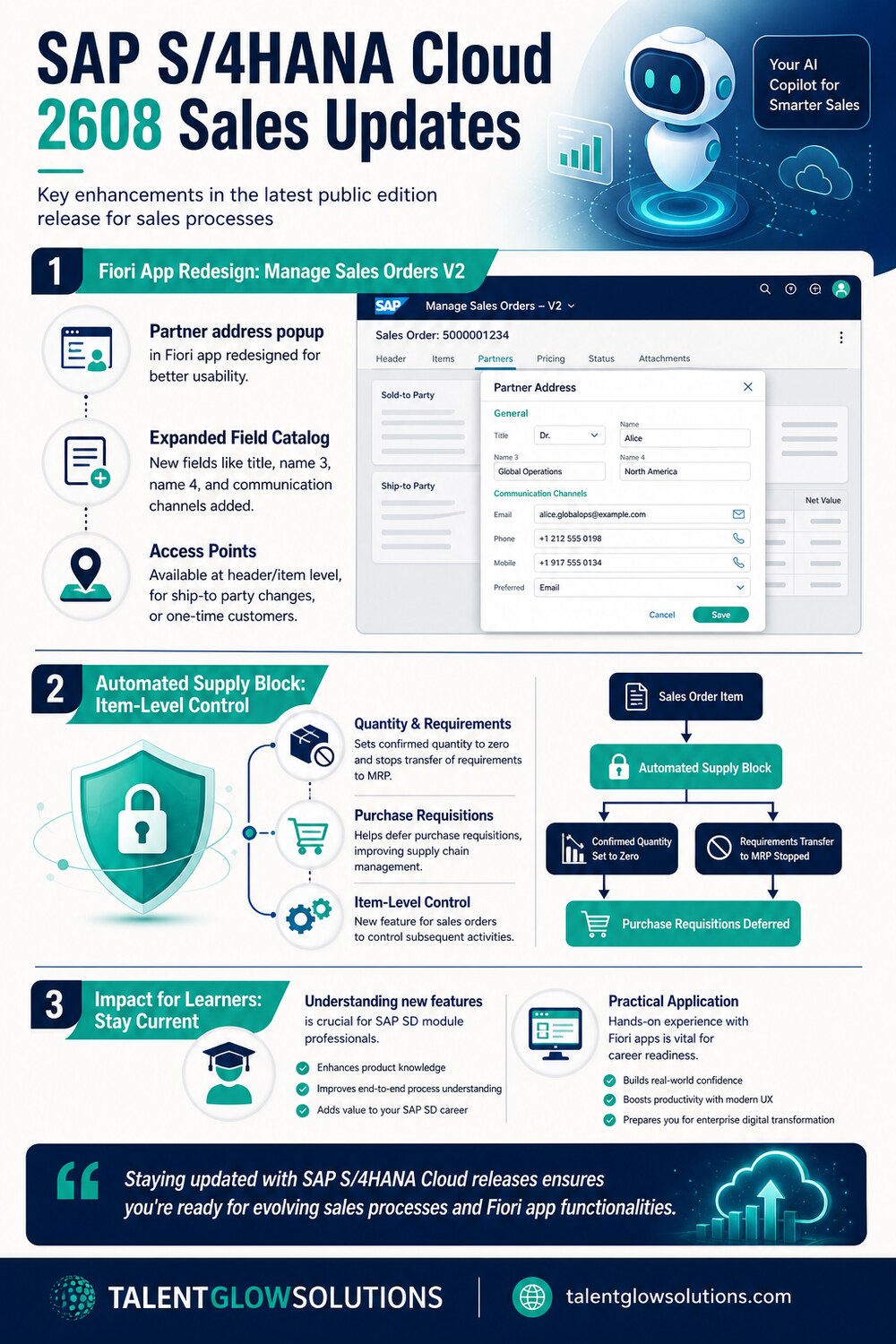
Address management capabilities within the SAP Fiori App "Manage Sales Orders – Version 2" have been significantly expanded. The partner address popup window has undergone a complete redesign, featuring a new layout and an expanded field catalog. This makes entering and managing partner details more intuitive and comprehensive.
- Redesigned Layout: The visual presentation of the popup is updated for better user experience.
- Expanded Field Catalog: More fields are available to capture detailed partner information.
Which New Fields Are Available in the Partner Address Popup?
The redesigned partner address popup now includes several new fields to capture more granular information. These additions ensure that all necessary details can be recorded directly within the Fiori app. This reduces the need for navigating to multiple screens or external systems.
- Title: Allows for formal salutations.
- Name 3 and Name 4: Provides additional fields for names, particularly useful for organizations or complex naming conventions (Name 4 is visible only in edit mode).
- Communication Channels: Includes phone, email, and fax fields for direct contact information.
- Street Prefix and Suffix: Enhances accuracy for complex street addresses.
Where Can Users Access the Redesigned Partner Address Popup?
Users can access the redesigned partner address popup from multiple points within the Fiori app. This ensures flexibility and ease of use during various sales order processing scenarios. Whether creating a new order or modifying an existing one, the enhanced functionality is readily available.
- Partners Table: Accessible at both the header and item level of a sales order.
- Changing Ship-To Party: When modifying the ship-to party details, the popup appears.
- One-Time Customer Entry: When entering information for a new, one-time customer.
What is the New Automated Item-Level Supply Block?
SAP S/4HANA Cloud Public Edition 2608 introduces a new automated item-level supply block for sales orders. This feature provides enhanced control over subsequent activities related to sales order items. It helps manage inventory and demand more effectively by preventing unwanted actions.
- Controls Subsequent Activities: Limits actions that can be taken on a blocked item.
- Sets Confirmed Quantity to Zero: Prevents items from being confirmed for delivery.
- Stops Transfer of Requirements to MRP: Halts demand signals from being sent to Material Requirements Planning.
- Defers Purchase Requisitions: Can postpone the creation of purchase requisitions for blocked items.
Why are these Updates Important for SAP Learners?
For SAP learners, especially those focusing on the SD (Sales and Distribution) module, these updates are highly relevant. The continuous evolution of SAP S/4HANA Cloud means that staying current with new features, particularly in Fiori apps, is essential for career readiness. Understanding these practical changes will make you a more competitive candidate.
| Feature Area | Previous State | Current State (2608 Update) |
|---|---|---|
| Partner Address Popup | Basic layout, limited fields | Redesigned layout, expanded field catalog |
| Address Fields | Standard name/address fields | Added Title, Name 3, Name 4, Comm. Channels, Street Prefix/Suffix |
| Access Points | Specific scenarios | Header/Item level, Ship-to changes, One-time customers |
| Supply Block | Manual or less granular | New automated item-level supply block |
| Impact on MRP | Direct requirement transfer | Can stop transfer of requirements to MRP |
These enhancements reflect SAP's ongoing commitment to improving user experience and process automation. Learners at TalentGlowSolutions benefit from mentor-led training on a live S/4HANA system, which allows them to explore and master such new functionalities in a practical environment.
How to Leverage These Updates in Your SAP Career?
To leverage these updates in your SAP career, focus on gaining hands-on experience with the new Fiori app features. Understanding how the redesigned partner address management works and how the automated supply block can be configured will set you apart. Practicing these scenarios will demonstrate your adaptability to the latest SAP innovations.
- Review SAP Release Notes: Regularly check SAP Community blogs for new releases.
- Practice on a Live System: Work with a live S/4HANA system to explore new Fiori app capabilities.
- Understand Business Impact: Analyze how these features improve efficiency and data quality in sales processes.
- Network with Experts: Discuss new features with experienced consultants to gain insights.
TalentGlowSolutions offers comprehensive training in SAP modules like SD, FICO, MM, PP, EWM, BASIS, and ABAP, providing the foundation needed to understand and implement these types of updates effectively. Our project-based approach ensures you're familiar with real-world application of SAP features.
Sources
Frequently asked questions
What is the most significant update in Sales for SAP S/4HANA Cloud Public Edition 2608?
The most significant update is the redesign of the partner address popup window in the "Manage Sales Orders – Version 2" Fiori app, which includes an expanded field catalog and a new layout for improved usability and data capture.
Which new fields are included in the updated partner address popup?
New fields include title, name 3, name 4 (visible in edit mode only), communication channels such as phone, email, and fax, and street prefix and suffix fields.
What is the purpose of the new automated item-level supply block?
The automated item-level supply block helps control subsequent activities for sales orders, such as setting the confirmed quantity to zero, stopping the transfer of requirements to MRP, and deferring purchase requisitions, enhancing supply chain management.
How does SAP S/4HANA Cloud Public Edition 2608 impact SAP SD professionals?
For SAP SD professionals, these updates mean a more efficient sales order management process, particularly with improved Fiori app capabilities and better control over supply chain activities. Staying updated on these changes is crucial for professional development.
Where can I find more details about these SAP S/4HANA Cloud 2608 updates?
Further details can be found in the official SAP Community blog post titled "What's New in Sales in SAP S/4HANA Cloud Public Edition 2608", published on September 21, 2026.
Ready to launch your career?
For hands-on experience with the latest SAP S/4HANA functionalities, TalentGlowSolutions provides mentor-led training and 100% placement assistance, though we do not guarantee a job.
Explore Programs Talk to us