SAP News
Streamlining Company Code Assignments to Profit Centers in SAP S/4HANA Cloud
Managing Company Code assignments to Profit Centers is a fundamental task in SAP S/4HANA, crucial for accurate financial reporting and consistent subledger postings. Historically, this often involved individual maintenance, especially when dealing with numerous Profit Centers and Company Codes. This routine effort could quickly become a significant administrative burden.
Good news for SAP S/4HANA Cloud users: a new capability is here. With the release 2602 of SAP S/4HANA Cloud Public Edition, the process has been significantly streamlined. This update introduces mass un/assignment functionality, transforming how these vital organizational links are managed.
What is the new mass assignment feature in SAP S/4HANA Cloud?
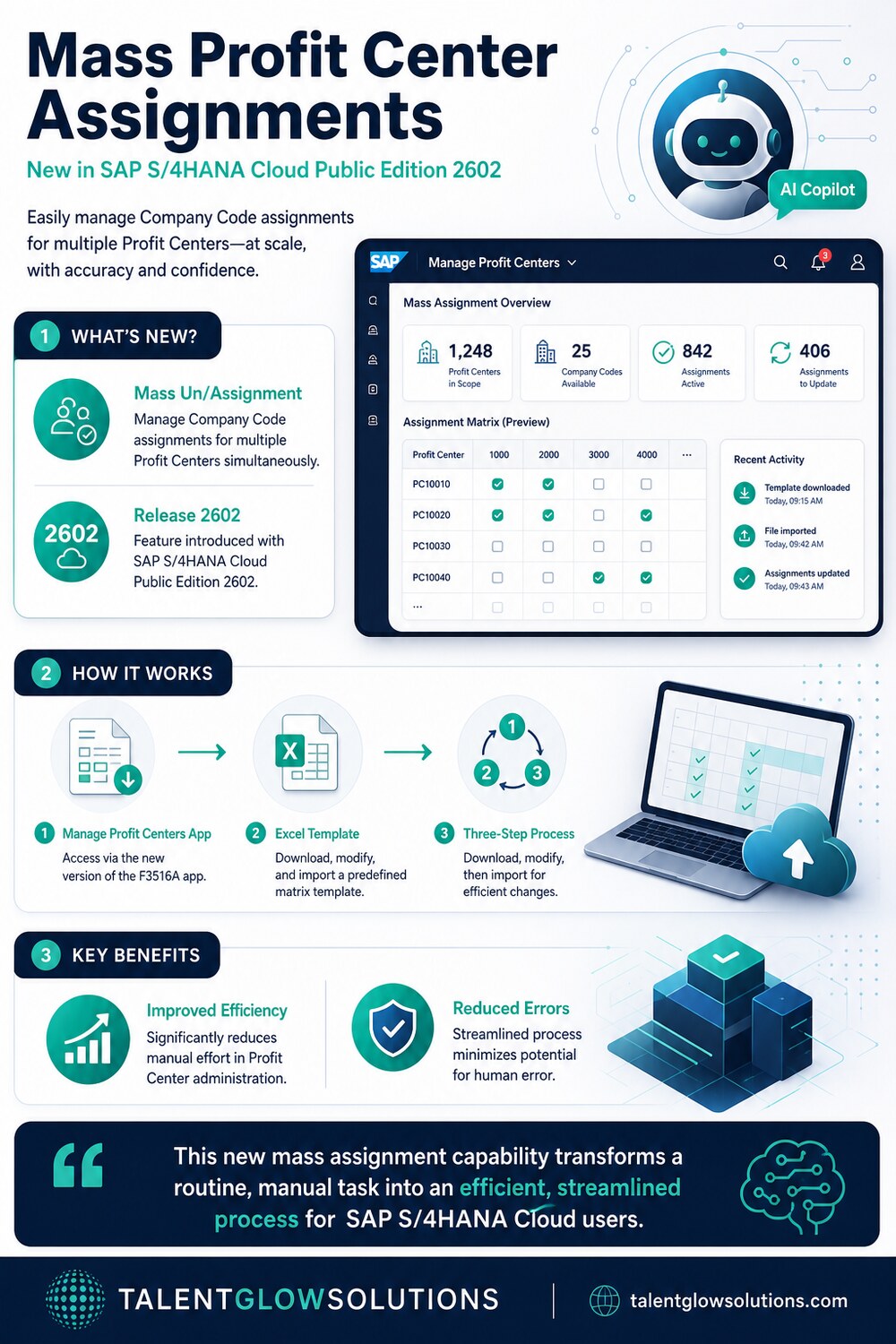
The new mass un/assignment capability allows users to manage Company Code assignments across multiple Profit Centers in a single operation. This feature was introduced with release 2602 of SAP S/4HANA Cloud Public Edition. It directly addresses the challenge of individual maintenance, which was previously a time-consuming effort for many organizations.
This enhancement means that instead of updating each Profit Center individually, users can now process dozens or even hundreds of Profit Centers at once. The goal is to boost efficiency and reduce the manual effort involved in Profit Center administration, ensuring that Profit Centers are correctly linked to their respective Company Codes.
Where can you find this new functionality?
This new functionality is accessible through the "Manage Profit Centers" app (New version - F3516A). This specific app is the gateway to the mass assignment capabilities. Users will need to ensure they have the correct access permissions to utilize this feature fully.
To access the "Manage Profit Centers (New Version)" app (F3516A), specific Identity and Access Management (IAM) apps must be assigned. Examples include F3516A_GL_TRAN or F3516A_TRAN. These assignments ensure that only authorized personnel can perform mass changes to Profit Center master data, maintaining data integrity and security.
How does the mass assignment process work?
The process for mass assignment of Company Codes to Profit Centers is designed to be user-friendly and efficient, involving three clear steps. It leverages a familiar tool: Microsoft Excel. This approach makes it easier for users to manage complex data sets outside the SAP system before importing the changes.
Here are the three steps for mass assignment:
- Download a predefined Excel template: This template is generated directly from the "Manage Profit Centers" app and provides a structured format for your data. It includes selected Profit Centers in rows and Company Codes in columns, offering a clear overview of current assignments.
- Modify the template in a spreadsheet: Users can then make their desired changes, such as assigning or unassigning Company Codes, within the Excel file. This allows for quick and visual manipulation of the assignments.
- Import the changes into the system: Once modifications are complete, the updated Excel file is uploaded back into the SAP system. The system then processes these changes, updating the Profit Center master data accordingly.
What are the benefits of mass processing for Profit Center assignments?
The primary benefit of this new feature is significantly improved efficiency and reduced manual effort in Profit Center administration. What used to take hours of individual updates can now be completed in a fraction of the time. This frees up valuable resources that can be redirected to more strategic tasks.
Beyond efficiency, mass processing also contributes to greater data consistency. By handling multiple assignments simultaneously, the risk of errors that can arise from repetitive manual input is minimized. This ensures that financial reporting and subledger postings remain accurate across all organizational units.
Understanding Company Code and Profit Center defaults
In SAP S/4HANA Cloud Public Edition, all Profit Centers and Company Codes operate within a single Controlling Area, which is A000. This unified structure simplifies management but also has implications for default assignments. Understanding these defaults is key to effective administration.
When a new Profit Center is created, all Company Codes are automatically considered assigned by default, unless explicit assignments have been manually defined. However, if explicit Company Code assignments already exist for a Profit Center, a newly created Company Code will appear as unassigned. In such cases, explicit action is required to link the new Company Code to the existing Profit Center.
How can you monitor changes made to Profit Center assignments?
Maintaining an audit trail for changes to critical master data like Profit Center assignments is essential. The system provides robust logging capabilities for this purpose. These logs help in tracking who made what changes and when, supporting compliance and troubleshooting efforts.
Users can review logs for Company Code assignments and mass changes in the "Display Profit Center Logs" app. This app offers transparency into all modifications, ensuring that administrators can monitor and verify the integrity of their Profit Center data. It's an important tool for maintaining accountability within the system.
Important considerations when working with Profit Center assignments
While the new mass assignment feature offers great flexibility, there are important cautions to observe. Especially when working in test environments, certain actions should be avoided to prevent unintended data inconsistencies. These guidelines help preserve the integrity of pre-delivered system configurations.
When testing in Starter or Demo systems, it is strongly cautioned not to deselect or remove Company Code assignments for SAP pre-delivered Profit Centers. These are typically identifiable as those starting with YB*. Modifying these standard Profit Centers can impact system functionality and might require significant effort to correct.
What this means for SAP learners and consultants
This new mass un/assignment feature in SAP S/4HANA Cloud Public Edition 2602 highlights SAP's continuous effort to enhance user efficiency and streamline administrative tasks. For SAP learners and consultants, understanding such updates is crucial for staying current and competitive. Practical experience with these new functionalities can significantly benefit your career. Learning how to efficiently manage tasks like Company Code assignments to Profit Centers, whether individually or through mass processing, is a valuable skill in today's SAP ecosystem. This kind of hands-on knowledge is what TalentGlowSolutions focuses on in its SAP FICO, MM, SD, PP, EWM, BASIS, and ABAP training programs, providing mentor-led guidance on a live S/4HANA system.
TalentGlowSolutions offers 100% placement assistance (we do not guarantee a job) to help you connect with opportunities after mastering these essential SAP skills.
Sources
- SAP Community blogs: Company Code Assignments to Profit Centers - From Individual Maintenance to Mass Processing
- help.sap.com :: https://help.sap.com/docs/SAP_S4HANA_CLOUD/f0d042517a434458b171ff5867b18445/afe6dfa42d794a5388151bb7f2d508f9.html
- help.sap.com :: https://help.sap.com/docs/SAP_S4HANA_CLOUD/f0d042517a434458b171ff5867b18445/3e7cc094a0644ff481fe6d44042cdb45.html
- help.sap.com :: https://help.sap.com/docs/s4hana-cloud-best-practices/accounting-and-financial-close-j58-pe/edit-company-code-assignment-profit-centers
Frequently asked questions
What is the new feature for Company Code assignments to Profit Centers?
The new feature is the mass un/assignment of Company Codes to Profit Centers, introduced with release 2602 of SAP S/4HANA Cloud Public Edition. It allows managing multiple Profit Center assignments simultaneously.
Which SAP app is used for mass Company Code assignments to Profit Centers?
The mass assignment functionality is available in the "Manage Profit Centers" app (New version - F3516A). Users need specific IAM apps like F3516A_GL_TRAN or F3516A_TRAN to access it.
How does the mass assignment process work with an Excel template?
The process involves three steps: downloading a predefined Excel template from the app, modifying the Company Code assignments within the spreadsheet, and then importing the updated template back into the system.
What are the main benefits of mass processing Company Code assignments?
The key benefits are improved efficiency and significantly reduced manual effort in Profit Center administration. It also helps in maintaining greater data consistency by minimizing errors from individual manual entries.
What should I be careful about when making Company Code assignments in test systems?
In Starter or Demo systems, it is cautioned not to deselect or remove Company Code assignments for SAP pre-delivered Profit Centers, typically those starting with YB***, to avoid impacting system functionality.
Ready to launch your career?
Deepen your understanding of essential SAP functionalities like Profit Center management with TalentGlowSolutions's mentor-led training and dedicated placement assistance.
Explore Programs Talk to us